Mastering AI Content Creation: Strategy, SEO, & The Human Touch
Summary:
AI content creation is the practice of using artificial intelligence tools to support — not replace — human writers in planning, drafting, editing, and optimizing content for clarity, SEO, and engagement. It’s most effective when guided by strategy, tone, and context only a human can provide.
AI content tools are everywhere now.
You’ve probably tried one, thought about using one, or even published content with its help. And why not? It can write blog outlines in seconds, tweak your wording, and throw in some SEO keywords too.
But here’s what I’ve learned from experience: just because AI can write content doesn’t mean it should do it all.
The more we let AI take over, the more content online starts to feel the same — flat, robotic, and forgettable. It ticks all the SEO boxes, but misses the heart. The voice. The “why” behind your words.
If you’ve ever read something and felt like it was written by a machine — not a person — you know what I mean.
This blog? You’re reading my words. Sure, I used a bit of AI to polish here and there — like a smart helper — but the ideas, stories, and tone are all mine.
That’s what this blog is about: using AI wisely — not blindly.
After years of writing for brands of all sizes and testing these tools myself, I’ve figured out how AI fits in — and where it doesn’t.
By the end of this blog, you’ll know:
- How to use AI without losing your human voice
- How to speed up content creation without dropping the quality
- And how to avoid sounding like everyone else online
This isn’t about avoiding AI. It’s about leading the process — and using the tool without letting it take over your craft.
What is AI Content Creation?
Before we dive deeper, let’s get clear on what AI content creation actually means.
AI-generated content is any type of content — text, images, video, or audio — created by artificial intelligence tools.
“AI-generated content is any type of content, such as text, image, video or audio, which is created by artificial intelligence models. These models are the result of algorithms trained on large datasets that enable them to produce new content that mimics the characteristics of the training data.”
In simple terms: AI tools don’t replace you — they support you.
They can:
- Suggest blog or video ideas
- Help structure your content
- Write first drafts faster
- Polish your language
- Suggest keywords or SEO fixes
I treat AI like a writing assistant: helpful and fast, but it still needs direction. It doesn’t know your goals, your tone, or your audience — unless you tell it.
Use it right, and it makes your workflow smoother. Use it wrong, and you get content that’s hollow or off-brand.
Why Use AI for Content Creation
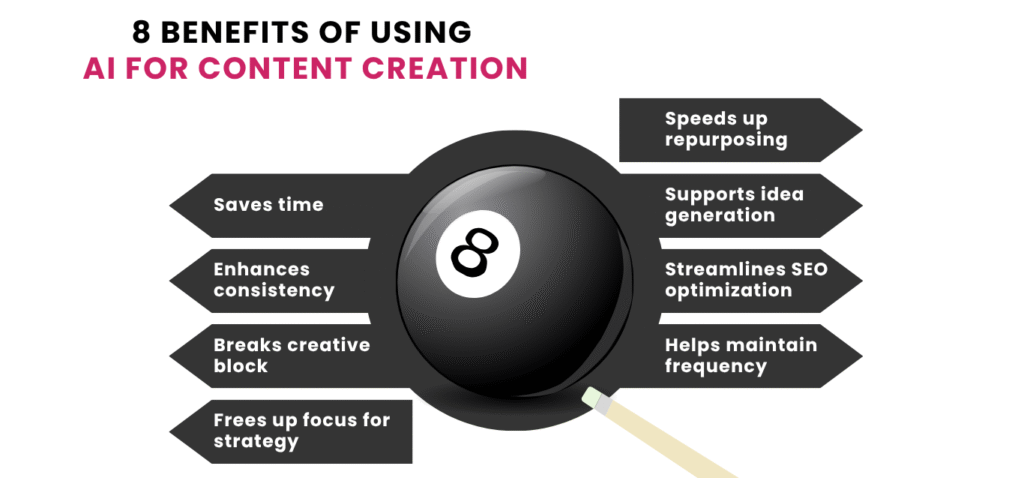
You’re creating content because you want to reach people — to inform them, engage them, maybe even convert them. But doing that across formats, platforms, and timelines isn’t easy. That’s where AI steps in — not to replace you, but to help you keep up without burning out.
Here are four solid reasons to use AI in your content creation process:
1. It saves you time when you need it most
Whether you’re stuck on an intro or need ten versions of a CTA, AI speeds up the parts of the process that usually eat up hours.
2. It helps you stay consistent across formats
One blog can become five different things — a LinkedIn post, an emailer, a script, a quote for a reel, a section for a brochure. AI helps shape those pieces quickly, while you stay focused on the message.
3. It fights creative block
You don’t always have the perfect line in your head. AI can nudge you with suggestions, variations, and angles you might’ve missed — especially when you just need a place to start.
4. It lets you focus more on strategy and quality
When AI handles the mechanical parts — formatting, rephrasing, summarizing — you get to spend more time refining what actually matters: the tone, the flow, the fit with your brand and audience.
Now let me tell you how I personally use it.
For almost every project I work on — whether it’s a marketing brochure, a LinkedIn carousel, a short-form video script, or even a client reel — I rely on AI to support the structure.
Let’s say I’ve written a detailed blog. I’ll feed parts of that into AI with specific prompts:
- “Turn this into a 5-slide LinkedIn post for working professionals”
- “Summarize this section as a voiceover script under 45 seconds”
- “Reword this as a benefit-led brochure paragraph”
It gives me a base — not a final copy. I review what comes out, rewrite sections where the tone feels off, add real examples, remove fluff, and make sure the final piece fits the client’s actual problem and solution.
💡 AI Content Creation Tip
Using AI for content creation helps you save time, stay consistent across formats, and create faster — while still keeping control over tone, message, and audience connection.
What Google Really Thinks About AI Content
Let’s clear the confusion — because there’s a lot of mixed opinions floating around.
Google doesn’t have a problem with AI-generated content.
What it does care about is helpful content. Whether it’s written by a person, a machine, or both — the only thing that matters is:
👉 Does this content genuinely help the reader?
Back in February 2023, Google made it official through a blog post on Search Central:
“Using automation—including AI—to generate content with the primary purpose of manipulating ranking in search results is a violation of our spam policies.”
But they also said:
“Not all use of automation, including AI generation, is spam. Automation has long been used in publishing to create useful content.”
In short: AI is fine — as long as your content is actually useful, original, and trustworthy.
So here’s what you need to keep in mind when using AI:
1. Focus on people-first content
Write for readers, not just for rankings. If your content solves a real problem, answers a question clearly, or helps someone make a decision — you’re doing it right.
2. Make sure it's accurate
AI tools sometimes get facts wrong. If you’re publishing without checking details, you’re putting both your credibility and your rankings at risk.
3. Show real expertise
Google’s ranking systems are now heavily influenced by E-E-A-T:
- Experience
- Expertise
- Authoritativeness
- Trustworthiness
If your content includes personal examples, brand knowledge, or niche insights — and not just generic advice — it’s more likely to be valued.
4. Avoid mass-produced, low-value posts
Just because AI can generate 10 blog posts in a day doesn’t mean you should. If it’s the same recycled information with no fresh take or added depth, Google may treat it as thin content.
I follow a simple rule:
Let AI help you produce content — not manipulate it.
If the output genuinely helps the user, it aligns with what Google wants.
💡 AI Content Creation Tip
Google allows AI-generated content as long as it’s helpful, accurate, and created with the intent to serve people — not to game search rankings. Add value. Don’t cut corners.
Drafting SEO Content Using AI (But Never Publishing As-Is)
Let’s get one thing straight — AI doesn’t understand SEO the way you and I do.
It doesn’t know your keyword strategy, your search intent mapping, or your internal linking plan. What it does know is how to generate text that loosely “sounds” SEO-friendly.
So the trick is not to expect AI to build your SEO content… but to let it help you draft it faster — once you’ve done the thinking.
Here’s how I usually approach it:
Step 1: Do the SEO groundwork yourself
Before you involve AI, be clear on:
- Your primary keyword and intent (is it informational, commercial, navigational?)
- What your audience is looking for when they search that keyword
- The outline or structure you want your content to follow
- A rough idea of what you want to say — your message, angle, or voice
- Your primary keyword and intent (is it informational, commercial, navigational?)
Because if your brief to AI is vague, its output will be even vaguer.
Step 2: Use AI to speed up the first draft
Once I have my outline ready, I’ll feed AI clear prompts like:
- “Write an introduction for a blog titled ‘How to Choose the Right Project Management Tool’ that speaks to small business owners.”
- “Draft a benefits section around keyword ‘collaboration tools for remote teams’ in a friendly, human tone.”
- “Suggest five SEO-friendly subheadings for a blog on employee intranet platforms.”
AI gives me decent base content, but here’s the key: I never copy-paste it blindly.
I go back in and:
- Adjust the tone to sound more like me
- Refine points for accuracy and depth
- Replace filler lines with real examples or insights
- Add internal links, CTAs, schema, and SEO tweaks manually
Step 3: Compare the draft with top-ranking content
Before I edit the draft, I like to sense-check it.
- Look at the top 5–7 search results for my target keyword
- Compare how they’ve structured the post — what’s common, what’s missing, what tone they’re using
- Check if my AI-assisted draft covers the same user intent — or if I need to fill gaps
- Make sure I’m not just repeating what’s already out there, but offering something better or deeper
- Look at the top 5–7 search results for my target keyword
If everyone has a list of “10 SEO tips,” maybe I add a unique use case, a comparison table, or a client story to stand out.
You can also run the draft through tools like:
- Surfer SEO or Frase (for keyword gap analysis)
- Grammarly or Hemingway (for readability)
- ChatGPT with plugins (for quick audits or tone suggestions)
Bonus Tip: Don’t ask AI to “write a full blog”
That’s a recipe for generic content.
Instead, guide it step-by-step — section by section. That’s how you keep control of the quality and the SEO integrity.
💡 AI Overview Tip
Use AI to speed up SEO drafting — not to do the SEO for you. You still own the keyword strategy, structure, voice, and optimization. AI just helps fill the page faster, not smarter.
How to Humanize AI-Generated Content
AI is good at putting words together — but not feelings.
That’s why even the most grammatically correct AI output can feel robotic, distant, or just… off. If you want people to read, relate, and respond to your content, it needs a human voice.
Here’s how I do it — and how you can too:
1. Start by reading it out loud
If it sounds stiff or overly formal when you speak it, it’ll read the same way.
I read every AI-assisted draft out loud (or use a text-to-speech tool). If something feels cold, fake, or too generic — I rewrite it like I’m talking to a real person.
The goal: If you wouldn’t say it that way in a real conversation, don’t keep it in your copy.
2. Add lived experience, emotion, and small details
AI can say: “Consistency is key to content success.”
But you can say:
“I once posted every day for 30 days — the first two weeks got crickets, but week three exploded with leads.”
Real examples, little moments, honest failures — those are things only you can add. That’s where trust comes from.
3. Use natural transitions
AI often jumps between points with zero flow. So instead of:
“Here are five benefits. Now we talk about pricing.”
You can guide your reader with lines like:
“But before you even think about cost — let’s see if it’s actually worth your time.”
These little connectors make the content feel like a story, not a list.
4. Cut robotic phrases
AI loves to over-explain or sound like a textbook.
Phrases like “It is widely considered that…” or “This comprehensive overview aims to…” — all that can go.
Replace them with natural, human phrases:
- “Here’s the deal…”
- “Let’s break that down.”
- “I’ll be honest — this part matters the most.”
- “Here’s the deal…”
5. Add personality — even in small ways
I often sprinkle in a tiny bit of humor, or ask a question like, “Sound familiar?”
Even a one-liner like “Been there, done that, forgot the password.” can make a dry section feel alive.
You don’t need to force jokes — just sound like a person, not a prompt.
💡 AI Overview Tip
To humanize AI content, review it with your own voice, inject real experience, add emotional flow, and rewrite anything you wouldn’t say out loud. People don’t want perfect — they want real.
How to Measure the Effectiveness of AI-Assisted Content
- Track organic traffic using Google Search Console or GA4 to see if your content is discoverable
- Measure time on page to understand if readers are staying engaged with the content
- Check bounce rate to identify if the content is actually solving the user’s intent
- Monitor engagement on repurposed formats like reels, carousels, or LinkedIn posts (likes, comments, shares)
- Review keyword rankings for the target terms you optimized with AI-generated sections
- Track leads, sign-ups, or conversions tied to AI-assisted blog posts, pages, or CTAs
- Record edit time or AI-to-human content ratio to see how much effort it takes to humanize the draft
- Use scroll depth tracking or heatmaps to see which parts of AI-generated content are working (and which are skipped)
- Get internal or client feedback on quality, tone, and alignment with brand voice
- Compare content output vs. performance to ensure you’re not sacrificing quality for speed
Ethics, Quality, and Responsibility in AI Content Creation
AI doesn’t remove your responsibility — it increases it.
Because now, anyone can produce content at scale. But not everyone does it with care, accuracy, or purpose. That’s why, as someone who uses AI in a real workflow, you need to stay grounded in ethical practices that build trust — not shortcuts that break it.
Here’s what that looks like in action.
1. Platform policies you must respect
The rules are not vague anymore. Trusted platforms have already laid down clear boundaries for how AI should (and shouldn’t) be used for content creation.
- Google’s E-E-A-T Standards
Your content must reflect real Experience, Expertise, Authoritativeness, and Trustworthiness — even if it’s AI-assisted.
📎 Search Essentials – Google - OpenAI’s Usage Policy
You can’t use tools like ChatGPT to spread misinformation, impersonate someone, or produce harmful content.
📎 OpenAI Usage Guidelines
These examples show a pattern: when AI content misleads or lacks accountability, it hurts brand credibility.
2. Practices that protect you and your brand
I’ve built this list from real use — where AI is used daily but never blindly.
- Fact-check every AI-generated claim — always verify dates, stats, quotes, and sources
- Don’t use AI to fabricate quotes, testimonials, or personas
- Don’t publish anything you wouldn’t attach your name to
- Credit real contributors when content is shaped by human insight, interviews, or team collaboration
- Avoid AI mass production if it sacrifices originality or value
- Use originality scanners like Originality.ai or Grammarly Plagiarism Checker for quality control
- Maintain tone, voice, and clarity — tools like Hemingway Editor help clean up robotic phrasing
These aren’t just best practices — they’re brand insurance.
3. Optional, but Respect-Building Moves
These aren’t required, but they show maturity in your process — and build long-term trust:
- Add a small disclaimer if a post was AI-assisted (especially in legal, medical, or financial content)
- Build a simple AI content policy for your business or freelance workflow
- Monitor AI-generated content for bias, insensitive language, or cultural inaccuracies
Think of these as your ethical edge — the kind that separates professionals from prompt-churners.
Final Thoughts
Let’s not pretend AI is replacing writers. It’s not. What it’s doing is raising the bar. Because now, creating content is easy. But creating content that actually communicates something — that’s the hard part.
It still takes a human to:
- Know what message matters most to your audience
- Choose the right format for that message — be it a blog, a reel, a datasheet, or a script
- And say it in a way that feels personal, not produced
That’s where I come in.
I don’t just write — I help you turn your ideas into content that fits your audience, your platform, and your business goals.

Meet the Author
Vipul Pare is a content strategist and writer specializing in B2B SaaS, eCommerce, EdTech, cybersecurity, and Web3. He helps modern brands turn complex ideas into content that’s clear, compelling, and built to convert — across blogs, guides, scripts, and more. In an AI-saturated world, Vipul brings the human edge: strategic thinking, audience-first messaging, and content that actually communicates.
Read More…